Most restaurants treat their Google listing as paperwork: someone filled it in three years ago, the phone number is right, the photos are so-so, and nobody has looked at it since. But that listing is the only public source describing your business, and two things come out of it that genuinely move revenue: which restaurants Google compares you against, and what anyone can find out about you in two minutes. This article is about both sides of that coin.
The data everyone can read
There is a curious asymmetry in hospitality. Nobody outside your business knows your internal numbers — average spend, margin per dish, real occupancy. But there is a second set of data about you that is entirely public, structured, and downloadable by anyone: your Google Business Profile.
It holds your category, your price level, your rating, your review count, your stated opening hours, your services, your photos and your exact location. The same fields, in the same format, for every restaurant on your street.
That makes Google the industry's census. And a census reads both ways: you can read your competitors', and they can read yours.
The fields that decide which set you compete in
When someone searches "dinner near me" or "italian restaurant [your neighbourhood]", Google does not choose between every restaurant in the city. It builds a candidate set and ranks within it. The fields on your listing are what decide whether you make that set.
The primary category. The most decisive field and the worst used. A restaurant serving rice dishes that categorised itself as plain "Restaurant" competes against everything; one that picked "Rice restaurant" competes against twenty. The primary category carries far more weight than the secondary ones.
The price level. The currency symbols are not decorative: they place your listing in a bracket. If you are marked as budget and your average spend is €45, you show up in front of people looking for something else — and those people leave mediocre reviews.
The stated hours. They determine whether you appear in "open now" searches, which are a huge slice of local demand. Out-of-date hours erase you from the map at precisely the times you are actually open.
Attributes and services. Terrace, reservations, accessibility, set lunch, vegetarian options. Each one is a filter somebody is applying right now.
Location and service radius. You do not decide who counts as nearby, but you do decide whether your pin sits where it should and whether your service area makes sense.
None of these fields is hard to fix. The hard part is noticing they are wrong.
Do you know who Google compares you against?
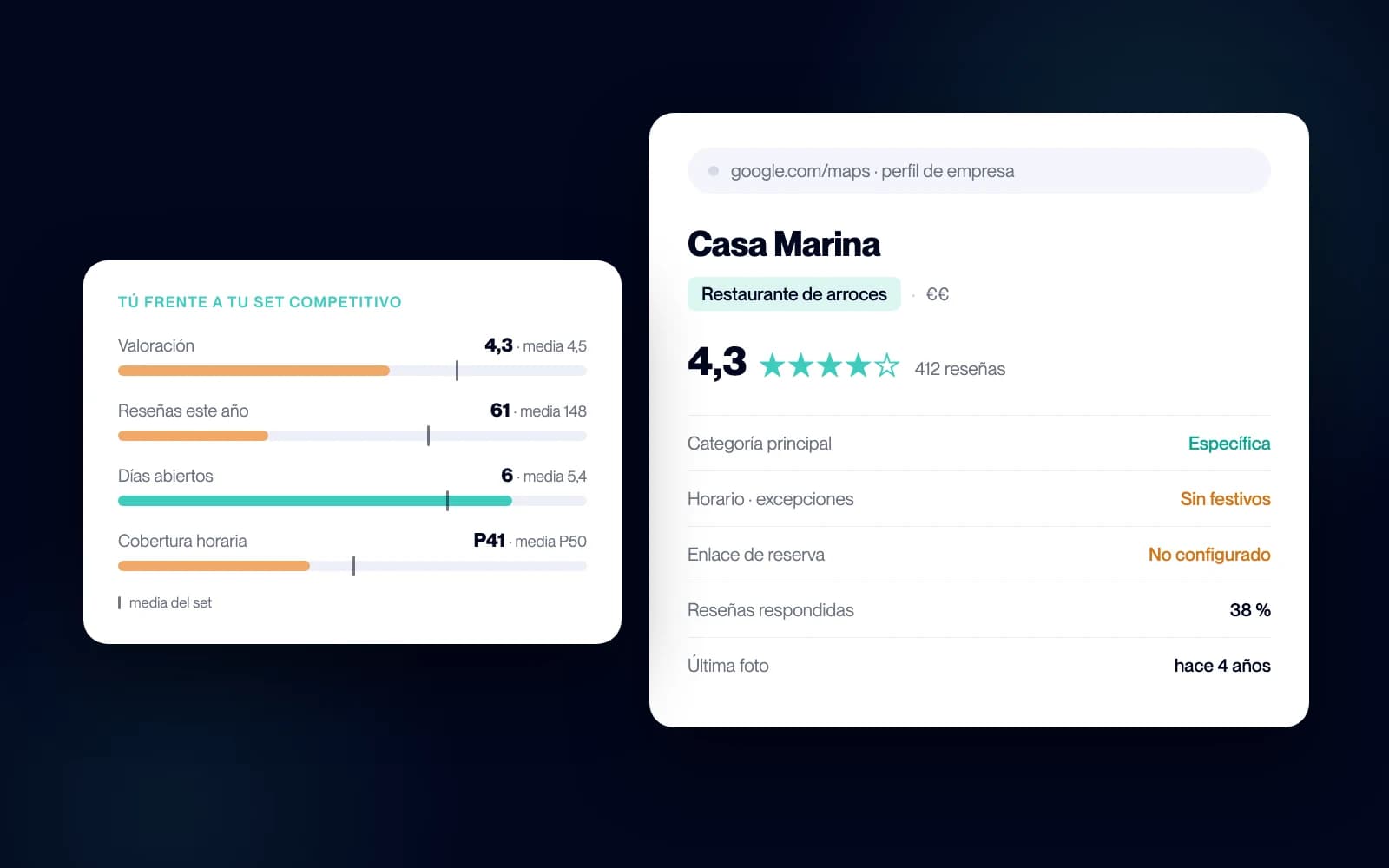
The Competitor Radar builds your competitive set from public data and places you inside it: rating, reviews, price, opening hours and occupancy, each with the average beside it.
Book a demoHow to read a competitor's listing in five minutes
Take the three restaurants most like yours and open them on your phone, one at a time. Ignore the cover photo: look at the fields.
Their primary category. If it is more specific than yours, they are competing in a smaller set, where getting to the top is easier.
Their reviews-per-year rate. Not the total — that just rewards age — but how many landed in the last twelve months. A restaurant with 400 reviews of which 300 arrived this year is doing something systematic to ask for them. One with 1,800 accumulated since 2016 and 40 this year is living off past glory.
Whether they reply to reviews. And above all, whether they reply to the bad ones. It is the most reliable sign of whether somebody is minding the digital channel or nobody is.
Their opening hours against yours. Especially the awkward slots: weekday afternoons, Sunday evening, Monday. That is usually where there is demand without supply.
Recent customer photos. They tell you what dishes people are photographing, which is a decent proxy for what they are ordering.
Three competitors and fifteen minutes gets you a rough diagnosis. The problem starts when you want to do it across the thirty restaurants you actually compete with, and then again next month to see what changed.
The listing mistakes that erase you
These are the ones that come up most, and every one is an afternoon's work:
A generic category. "Restaurant" instead of the specific category describing what you do. The most expensive mistake, because it drops you into the most crowded set there is.
Hours with no exceptions. Holidays, closures, rest days. Google penalises a listing whose information does not match what users report, and the customer who finds the door shut tends to say so publicly.
A phone nobody answers. The listing sends calls — far more than most owners think — and a missed call from Google is a booking that went to the next result. If you cannot guarantee it is always answered, you at least need to know how many you are losing.
No booking link. If your listing does not lead to your own reservation system, the customer ends up booking through an OTA or a portal that charges you commission on a customer who had already found you.
Unanswered reviews. The negative ones especially. A well-written reply to a bad review is more persuasive than ten unanswered five-star ones, because it proves somebody is there.
Photos from four years ago. A listing is read in two seconds, and the photo is the only thing seen in the first one.
From a manual glance to the whole set
Checking three listings by hand works as an exercise. It does not work as a method, for two reasons.
The first is size: your real competition is not three restaurants but somewhere between twenty and a hundred and fifty depending on your area, and comparing them field by field by hand is work nobody repeats two months running.
The second is subtler: a listing on its own tells you nothing without the average. Having 4.3 stars means nothing until you know whether your set averages 4.1 or 4.6. Opening six days a week means nothing until you know that 76% of your competition closes on Mondays. The number that matters is not yours — it is the gap between yours and everyone else's.
That is exactly what Bookline's Competitor Radar does: it gathers that public data across the hundreds of restaurants in your area, builds your competitive set and places you inside it in percentiles. Your rating, your reviews, your price, your open days and hours, your estimated occupancy by time slot — each with the set average beside it and the distance between the two.
That is something you can decide on: if the problem is your rating, how many five-star reviews it takes to move up a step; if it is opening coverage, which slot holds demand you are not taking; if it is positioning, which corner of the price-quality matrix you have ended up in without meaning to.
For a detailed walk through those metrics, see competitor analysis for restaurants: 10 numbers worth reading.
What the listing will not tell you
It is worth knowing where this method stops, because some people ask public data for more than it can give.
The listing does not know anyone's real average spend, only a declared price bracket. It does not know margin. It does not know how many people walked in without booking. And occupancy estimated from public data is a trend signal, not a till reading.
What is reliable is the relative comparison. Your neighbour's estimated occupancy may not be exactly 56%, but if the system measures everyone the same way, the fact that they come out twenty points above you is a real difference — and that is the one you care about.
And there is something the listing does not capture at all: what happens when somebody calls. Google can send thirty people a day to your phone, but if the line is engaged at half past two, those calls appear on no dashboard anywhere. It is the most common leak between visibility and booking, and it shows up on nobody's listing — not yours, and not your competitors'.
Frequently asked questions
Are Google Business Profile and Google My Business the same thing?
Yes. Google renamed "Google My Business" to "Google Business Profile" in 2021, but the old name is still widely used in the industry. It is the same product: your business listing in Search and Maps.
Can changing my primary category cost me rankings?
It can move your position, yes, because it changes the set you compete in. Going from a generic category to a specific one usually means losing some visibility on broad searches and gaining it on the ones that describe what you actually do — which are the ones that bring customers with intent. Change one thing at a time and leave two or three weeks before touching the next.
How many reviews do I need to raise my rating?
It depends on your current average and how many you have accumulated. With 200 reviews and a 4.3, it takes roughly 60 five-star reviews to reach 4.5; with 1,000 reviews, the same step needs more than 300. Which is why a rating is easier to move the sooner you start.
Can I see my competitors' data without tools?
Yes — everything described here is public and can be checked restaurant by restaurant. What is not viable by hand is the aggregate: building the set, working out the averages and repeating it every month.
How often should I review all this?
Your own listing, once a quarter and whenever you change hours or menu. The comparison against the set, once a month is plenty: this data moves slowly.
Do Google reviews affect my direct bookings?
A great deal. The rating is the filter most people apply before they even open a listing, and past a certain gap with your set they never see you at all. It is the part of the funnel that happens before booking is even an option.
Where to start
If you only do one thing this week, open your listing and check three fields: the primary category, the opening hours with their exceptions, and where the booking button leads. All three are an afternoon's work, and all three decide whether you show up.
Then look at the gap. Who Google is putting you against, and where you sit below that average. The Competitor Radar gives you that picture in a couple of minutes, and looking costs nothing.
Then there is the part no listing solves: making sure the call that comes in from Google is always answered, even at three o'clock on a Saturday afternoon. At Bookline that is precisely what we automate.
Want to see how it would work in your restaurant? Book a free demo.